Most "the agent got dumber" bugs have nothing to do with the model. They usually live in one of four engineering layers around it, and until you know which layer owns the bug, you'll fix the wrong thing with a lot of confidence.
I split agent engineering into four practical layers, organized from the model outward:
- Context engineering: what the agent knows
- Loop engineering: how it thinks and acts repeatedly
- Harness engineering: how it's controlled and protected
- Graph engineering: how multiple steps and agents are organized
Here's how those four fit together, plus the system prompt, the layer underneath all of them that started this whole naming trend. The list above goes from the model outward; the diagram below goes the other way, outside-in, since that's the direction the layers actually nest:
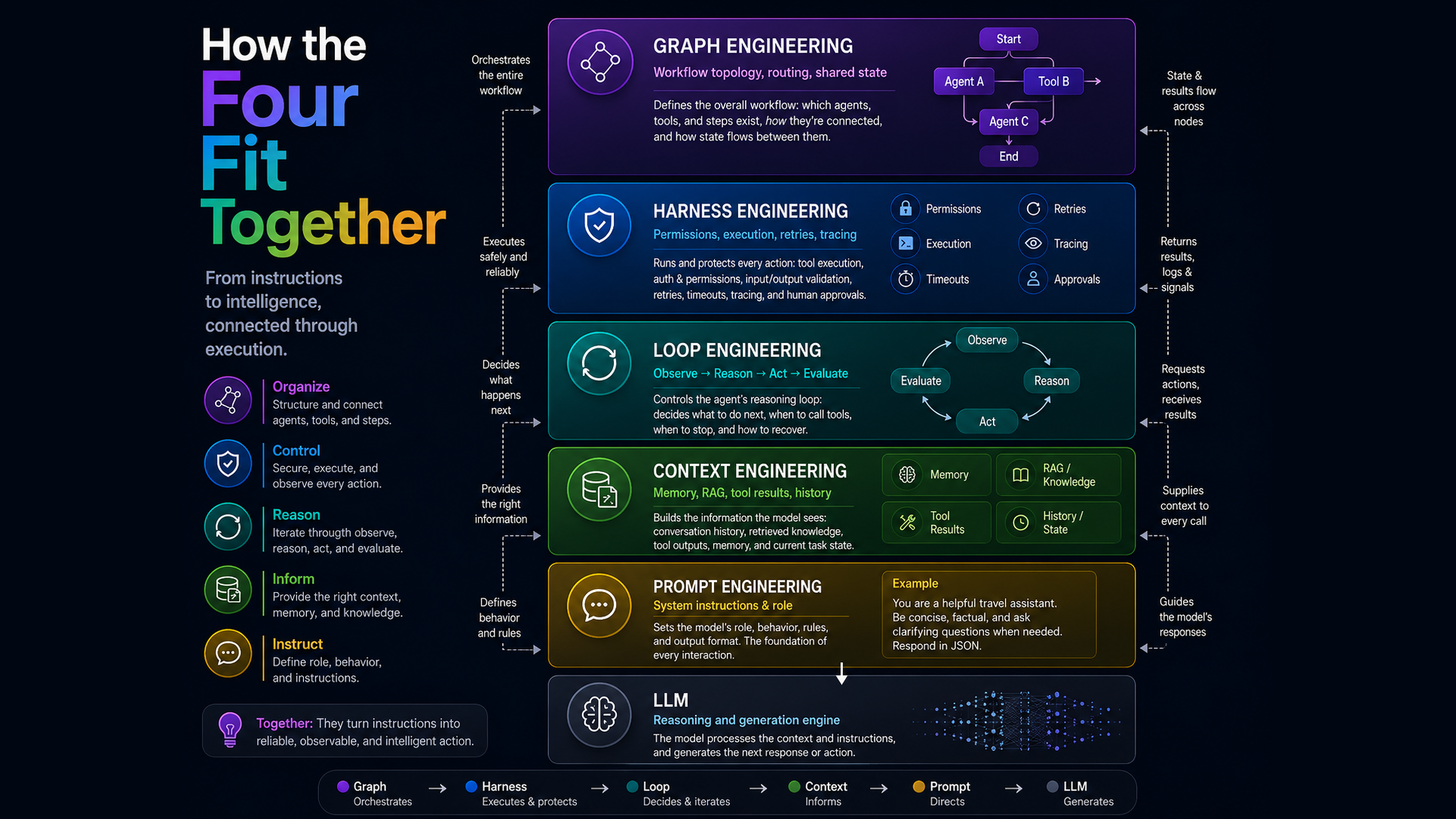
Five boxes here, not four. Prompt isn't a separate layer in this post, it's the innermost part of context, more on that in section 7.
Table of Contents
1. Context Engineering
What does the model know right now?Every call to the model is really just a text blob assembled from several different sources, sent fresh each time. Context engineering is the job of deciding what goes into that blob and what gets left out: not the whole conversation ever had, not every document you have access to, just the slice that's actually relevant to answering this one request right now. Get it wrong and the model isn't reasoning worse, it's reasoning correctly over the wrong inputs, which looks identical to a dumber model from the outside but has a completely different fix.
This layer controls everything the LLM is given on a call:
- System instructions: the role, constraints, and output format the agent operates under for the entire task
- User request: what was actually asked, verbatim, not a paraphrase the agent invents later
- Conversation history: prior turns in this session, either raw or compacted depending on how long the conversation has run
- Retrieved documents (RAG): knowledge pulled from a vector store, search index, or file system, specific to this query
- Tool descriptions: the schemas telling the model what tools exist and how to call them
- Tool results: the actual output from a tool call, fed back in on the next iteration, distinct from the tool's description
- Memory: anything persisted across sessions, not just recalled within this one conversation
- Current task state: structured data the agent is tracking, like a cart, a plan, or a checklist
Three terms in this space get used as if they mean the same thing, and don't:
| Term | What it actually is | Example |
|---|---|---|
| Prompt | The static instructions, set once and rarely rewritten per call | "You are a helpful travel assistant. Respond in JSON." |
| Context | Everything assembled fresh on this call, the prompt included | System prompt + history + RAG + tool results, from the list above |
| RAG | One technique for filling part of the context, not the whole discipline | A vector store or search index queried for this specific request |
Every call boils down to one assembly step:
user question
+ system prompt
+ relevant documents
+ previous tool results
= model context
Poor context, not a "dumber" model, is usually what causes hallucination, confusion, and irrelevant answers. The hard part is that every call competes for the same fixed token budget, so context engineering is really budget allocation:
TOKEN_BUDGET = 8000

def build_context(system_prompt, retrieved_docs, history, latest_tool_output):
    reserved_system = count_tokens(system_prompt)
    reserved_tool = count_tokens(latest_tool_output)
    remaining = TOKEN_BUDGET - reserved_system - reserved_tool

    # compact history first, it's usually the cheapest to summarize
    history_budget = int(remaining * 0.4)
    history_trimmed = compact_if_needed(history, max_tokens=history_budget)

    # whatever's left goes to retrieval, ranked by relevance not recency
    docs_budget = remaining - count_tokens(history_trimmed)
    docs_trimmed = top_ranked_chunks(retrieved_docs, max_tokens=docs_budget)

    return {
        "system": system_prompt,
        "history": history_trimmed,
        "retrieved": docs_trimmed,
        "tool_output": latest_tool_output,
    }
Whatever gets compacted away is a bet that it wasn't important. I covered the caching and compaction mechanics ADK gives you for this in Google ADK - Context Management. The rule I use: anything the agent must never forget goes in state or the system prompt, not in history that's a candidate for summarization.
Compaction isn't the only lever, sometimes the fix is never loading the full thing in the first place. If a task only touches 200 lines out of a 100,000-token repository, hand that slice to a subagent instead of stuffing the whole codebase into the main agent's window. A subagent that only sees what it needs can't get confused by what it doesn't.
Position matters too, not just size. Models pay the most attention to whatever sits at the very start and the very end of the context window, and noticeably less to the middle. The system prompt and the most recent turn already sit in strong positions by default, so the thing worth double-checking is whether a critical instruction has ended up buried in the middle of a long block of retrieved documents, where it's statistically likely to get less weight than it needs.
2. Loop Engineering
What should it do next, and when should it stop?An agent rarely makes just one LLM call and stops. Ask it to do anything non-trivial and it needs to check something, act on what it finds, and decide whether that was enough, then repeat until the task is actually done or it's clear it won't get there. That repeating cycle is the loop, and loop engineering is the discipline of deciding how it should behave: how many iterations are reasonable, what counts as progress, what counts as stuck. A loop with no real termination logic doesn't crash or throw an error. It just keeps running, quietly burning tokens on a task it already failed several steps ago.
For example, "find the cheapest flight":
- User asks: find the cheapest flight.
- LLM decides to call the flight-search tool.
- Tool returns flights.
- LLM compares results.
- LLM may search another date.
- LLM returns the recommendation.
Loop engineering controls:
- When to call tools: deciding the current step needs an action, not just more reasoning
- When to try a different approach: recognizing the last attempt didn't move things forward and something else needs to change
- The maximum number of steps: a hard ceiling so a non-converging task fails loudly instead of running forever
- When to ask for clarification: recognizing the task is underspecified rather than guessing and burning a step on a wrong assumption
- When to stop: the actual termination condition, model self-declares done, an explicit tool signal, or a step budget running out
Not all stopping conditions are equally trustworthy. A model announcing "I fixed the bug!" is a self-declared stop, and it's the weakest one, since it's just the model's opinion of its own work. A verified stop checks an actual ground truth instead: run pytest, look at the real exit code and the un-truncated output, and only exit the loop when that says done. The difference matters because a self-declared stop can be wrong in exactly the way a confident-but-incorrect answer usually is.
A quick vocabulary check for this section too, since these three get flattened into just "the agent" a lot:
| Term | What it actually is | Example |
|---|---|---|
| Step | One pass through observe, reason, act | One tool call and the result that comes back |
| Loop | The whole repeating cycle across many steps | The for step in range(MAX_STEPS) loop below |
| Agent | A model plus a loop, working a task start to finish | The flight-search example above, beginning to end |
Worth being precise about "retry" here, because it means something different at this layer than it does at the harness layer below. A loop retry is a reasoning decision: the agent tries a different search query because the first result wasn't good enough. A harness retry is an infrastructure decision: the runtime resends the exact same API call because it timed out. One is the agent changing its mind; the other is the runtime not trusting the network. Getting that mixed up is why "add more retries" so often makes a flaky agent worse instead of better.
The goal at this layer is simple: get the agent to finish the task reliably, without looping forever. I'd rather write the stopping condition out explicitly than trust a framework default I can't see:
MAX_STEPS = 8

def run_agent_loop(query, model, tools):
    transcript = [{"role": "user", "content": query}]
    seen_calls = set()

    for step in range(MAX_STEPS):
        response = model.generate(transcript, tools=tools)

        if response.is_final_answer:
            return response.text

        call_signature = (response.tool_name, tuple(response.tool_args.items()))
        if call_signature in seen_calls:
            # same tool and args as before, the loop isn't converging
            transcript.append({
                "role": "system",
                "content": "That exact call already ran. Try a different approach or stop.",
            })
            continue
        seen_calls.add(call_signature)

        result = tools[response.tool_name](**response.tool_args)
        transcript.append({"role": "tool", "name": response.tool_name, "content": result})

    return "Stopped: step budget exhausted without a final answer."
That seen_calls check catches more real bugs than prompt tweaks ever have. An agent repeating itself is usually stuck because the last result gave it nothing new to act on.
3. Harness Engineering
How is execution controlled, secured, and observed?None of the reasoning a model does matters if nothing stands between its decision and the real world. The harness is that boundary: the code that actually executes what the model decided, checks whether it was allowed to, and contains the blast radius when it's wrong. It has to behave the same way every single time, the identical permission check, the identical timeout, regardless of how confident or reckless the model sounded on that particular call. An agent without one isn't cautious by default. It's just fast.
Worth separating three things people tend to lump together here:
| Term | What it actually is | Example |
|---|---|---|
| Model | Generates the reasoning and the tool calls, nothing else | Gemini 3.5 Flash, Claude Sonnet 5 |
| Framework | The SDK you write agent logic against | Google ADK, LangGraph, AutoGen |
| Harness | The actual runtime that executes what the framework produces, permissions, sandboxing, and all | Claude Code's own harness, a sandboxed CLI runtime |
The ADK code in the Graph section further down is a framework. It's what you write. The harness is what runs it, and that distinction is exactly why a well-built harness can make a smaller, cheaper model outperform a frontier model running loose in a sloppy one.
The harness is the software runtime around the loop. It handles:
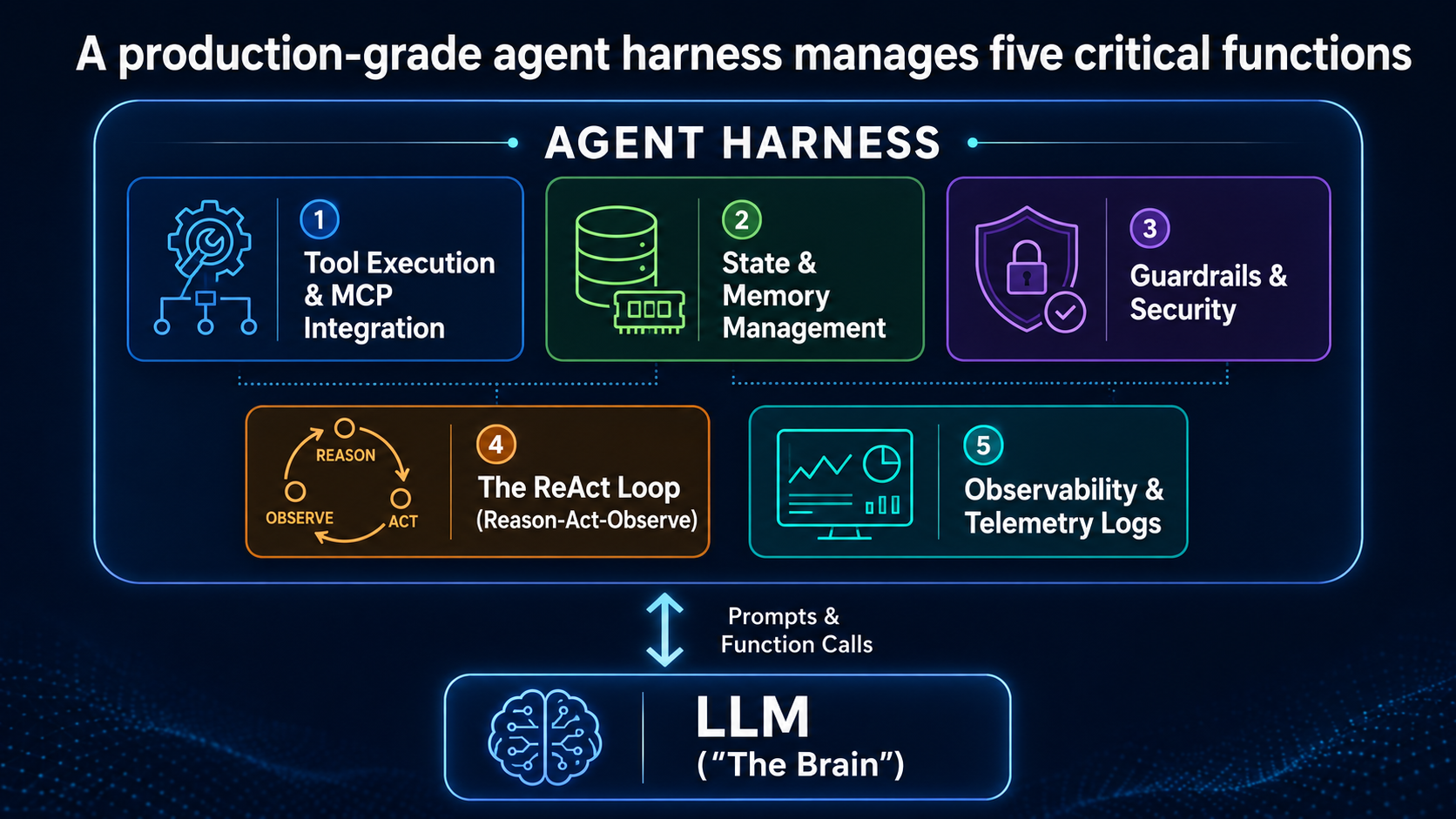
- Tool execution: actually running the function call the model requested, in a sandboxed or controlled environment
- Authentication and permissions: verifying the agent, and the user behind it, is allowed to take this specific action
- Input/output validation: checking arguments and results match expected shapes before anything downstream trusts them
- Timeouts and automatic retries on transient failures: resending a call that failed for infrastructure reasons, not reasoning reasons
- Logging and tracing: recording what actually happened, so a failure is debuggable afterward instead of a mystery
- Cost and token limits: hard caps on spend per call, per run, or per user, so one runaway loop can't blow the budget
- Guardrails: rules that block specific categories of action outright, regardless of what the model argues for
- Human approval: a pause point before anything irreversible, where a person has to say yes
- Error handling: what happens when something fails cleanly, versus when it fails in a way nobody anticipated
- Evaluation and monitoring: ongoing checks on whether the agent is still behaving the way it did when it was tested
Say the LLM decides to call delete_database. The harness is what asks, before anything runs:
- Is this tool permitted?
- Does the user have access?
- Is human approval required?
- Are the arguments valid?
- Should this action be logged?
I've learned to keep this code deliberately boring. It shouldn't be clever. It should be hard to bypass:
import time
import functools

class StepBudgetExceeded(Exception):
    pass

def harnessed(max_retries=2, timeout_s=15, cost_ledger=None, cost_limit=1.00):
    def decorator(tool_fn):
        @functools.wraps(tool_fn)
        def wrapper(*args, **kwargs):
            if cost_ledger and cost_ledger.total >= cost_limit:
                raise StepBudgetExceeded(f"Cost cap ${cost_limit} reached")

            last_err = None
            for attempt in range(max_retries + 1):
                try:
                    result = tool_fn(*args, timeout=timeout_s, **kwargs)
                    if cost_ledger:
                        cost_ledger.record(tool_fn.__name__)
                    return result
                except TimeoutError as e:
                    last_err = e
                    time.sleep(2 ** attempt)  # backoff, not a hot loop
            raise last_err
        return wrapper
    return decorator

@harnessed(max_retries=2, timeout_s=10)
def call_search_api(query: str, timeout: int):
    ...
Nothing in that code reasons about anything, and that's on purpose. If the agent does the right thing too many times, too slowly, or too expensively, that's a harness problem. If it does the wrong thing, that's not this layer.
4. Graph Engineering
How are agents and workflow steps connected?A single agent running a single loop only gets you so far. Past a certain complexity you need a researcher, a reviewer, and a database specialist all working off the same request, not always in the same order, sometimes in parallel, sometimes routed back for another pass. Graph engineering treats that whole arrangement as a structure you design deliberately, rather than a pile of function calls that happened to end up working together. Without it, multiple agents don't collaborate. They take turns being confidently wrong about the same task, and nobody notices until the output ships.
Graph engineering defines how agents, tools, and deterministic steps are connected, routed, and coordinated:
- Nodes: the individual units of work, agents, tools, deterministic functions, or validators, each with a single responsibility
- Edges: the transitions between nodes, sequential when one step always follows another, conditional when the next node depends on what the last one returned, or fan-out/fan-in when several nodes run in parallel and their results merge back into one, like the
ParallelAgentbelow - State: the data that flows across the workflow, written by one node and read by another downstream
- Conditions: the rules that decide which node runs next, based on a node's output or the current state
- Branches: alternative paths through the graph, for retries, escalations, or parallel work that later reconverges
Same exercise for this section's vocabulary, since "node" doesn't always mean "agent":
| Term | What it actually is | Example |
|---|---|---|
| Node | One unit of work in the graph, not always an agent | search_agent, or a plain validation function with no model call at all |
| Edge | The transition between two nodes | Sequential, conditional, or fan-out/fan-in, as above |
| Graph | The whole structure of nodes and edges together | The research_pipeline in the code below |
from google.adk.agents import SequentialAgent, ParallelAgent, LlmAgent

search_agent = LlmAgent(
    name="search_agent",
    model="gemini-3.5-flash",
    instruction="Search the web for the requested topic and write findings to state.",
    output_key="search_results",     # the contract with reviewer_agent
)

database_agent = LlmAgent(
    name="database_agent",
    model="gemini-3.5-flash",
    instruction="Query internal records relevant to the topic.",
    output_key="db_results",
)

reviewer_agent = LlmAgent(
    name="reviewer_agent",
    model="gemini-3.5-flash",
    # reads {search_results} and {db_results} out of shared state
    instruction="Using {search_results} and {db_results}, produce the final answer.",
)

pipeline = SequentialAgent(
    name="research_pipeline",
    sub_agents=[
        ParallelAgent(name="gather", sub_agents=[search_agent, database_agent]),
        reviewer_agent,
    ],
)
Graph engineering is especially useful for multi-agent systems, approval workflows, long-running processes, parallel execution, conditional routing, and deterministic business processes. The point isn't to make things look impressive on a whiteboard. It's to coordinate a complex workflow in a way you can actually reason about later.
I've found that most graph bugs live in that output_key contract. The reviewer reads {search_results} and {db_results}. If either name drifts between nodes, the reviewer writes about nothing: no error, no exception, just a bland answer that looks like a prompting problem until you check the state dict.
5. How the Four Fit Together
A graph organizes nodes and transitions. Each agent node may run a reasoning loop. The harness supervises that execution with permissions, retries, limits, tracing, and approvals. Every model invocation receives a constructed context. That's one common shape, not the only valid one. Some runtimes fold the loop directly into the harness rather than treating them as strictly separate layers, but the four questions below still apply regardless of how the code is organized.
A simple way to remember what each layer is actually asking:
| Layer | Main question |
|---|---|
| Context | What does the model know right now? |
| Loop | What should it do next, and when should it stop? |
| Harness | How is execution controlled, secured, and observed? |
| Graph | How are agents and workflow steps connected? |
The LLM is the reasoning engine. These four layers are what turn it into a reliable production agent.
6. A Layer-by-Layer Debugging Checklist
Most "the model got dumber" tickets aren't about the model at all, and prompt edits won't touch any of them. Here's a real symptom run through all four layers: the flight-search agent from earlier keeps calling the same tool with the same dates, over and over, and never returns an answer. Same symptom, four different possible causes, four different things to actually go check:
| Layer | What to check | What you'd find |
|---|---|---|
| Context | Log the exact dict build_context() returns for this call, field by field, and diff it against the previous call |
The earlier flight-search result got compacted out of history_trimmed, so the model has no memory of already trying this |
| Loop | Grep the transcript for repeated entries in seen_calls |
The same (tool, args) signature appears twice, meaning the dedup check exists but nothing stopped the retry |
| Harness | Check the retry counter inside the harnessed() wrapper against cost_ledger.total |
2 attempts logged for a call the agent's own transcript shows as happening once, so the timeout/retry wrapper is the one repeating it |
| Graph | Log which node routed back to the search agent, and why | A downstream reviewer node rejects the result and routes back every time, regardless of the actual rejection reason |
All four produce the exact same symptom from the outside: the same tool call, again and again. Only one of them is the actual cause, and the fix is different depending on which layer it is.
7. Further Reading
None of these terms appeared at once. Each one emerged as a reaction to the limits of the one before it, in a tight sequence over about four years:
| Term | When | Credited to |
|---|---|---|
| Prompt Engineering | 2020–2022 | Coined around GPT-3 (Gwern Branwen); went mainstream in 2022 as developers found small wording changes produced large output changes |
| Context Engineering | June 2025 | Tobi Lütke (Shopify), in a June 19, 2025 tweet; amplified by Andrej Karpathy days later |
| Harness Engineering | February 2026 | Mitchell Hashimoto (HashiCorp/Terraform), February 5, 2026; institutionalized six days later by an OpenAI engineering post |
| Loop Engineering | June 2026 | Peter Steinberger (OpenClaw), June 7, 2026; popularized by Addy Osmani, citing Boris Cherny at Anthropic |
| Graph Engineering | July 2026 | Earliest documented use by Josh Simmons, July 4, 2026; crystallized by Peter Steinberger's July 18 post asking whether the field had "shifted to graphs yet" |
Prompt engineering isn't a separate layer in this post's framework. It's folded into context engineering as one input among several, see section 1. Here's where to read more on each term:
- Prompt Engineering: "The Hidden History of Prompt Engineering"
- Context Engineering: Anthropic, "Effective Context Engineering for AI Agents" and Sourcegraph, "Context Engineering: A Practical Guide for AI Agents"
- Harness Engineering: "The AI Agent Harness Lexicon: A Complete Field Guide to 2026's Big Tech Buzzword" and Martin Fowler, "Harness Engineering for Coding Agent Users"
- Loop Engineering: Oracle, "What Is the AI Agent Loop?" and Data Science Dojo, "Agentic Loops: From ReAct to Loop Engineering"
- Graph Engineering: TrueFoundry, "Graph Engineering for Multi-Agent Systems" and "Forget Loop Engineering, Graph Engineering Is About This"